Not everything that arrives needs a person. New registrations and purchases mostly look after themselves, so they are counted rather than queued: the bell says how many are new, and the rail on Home says how things stand.
The screens pictured here are an example ministry’s, so the names and figures in them are not yours. Everything they show works the same way in your own admin.
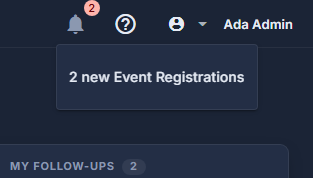
Press the bell, top right.
The number on it is the total of everything new since you last looked. Each line says how many of one kind - "3 new Purchases" - and pressing it opens where they are.
Look at the rail on the right of Home.
My follow-ups: every one you owe that is still open, late ones first, with Done on each. Upcoming events, each with how many have registered and a NEW badge for registrations since you last looked. Orders in flight, each with how far through packing and posting it is. Press an order to open it. Each card folds shut on its heading.
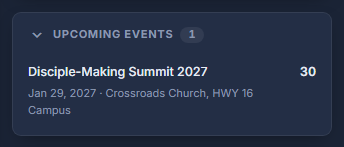
Upcoming events on the rail, each with its count. Nothing to do? The list says so.
"Nothing is waiting on you right now" means exactly that. If part of the list could not be read it says so instead, with a Retry button - that is a connection problem, not an empty queue.
A member of staff who has been granted a few screens sees "Your screens" at the top of Home instead of the whole queue - only the rows for records on screens they can open.