A registration alert, a request from the website, an order nobody has acknowledged, a follow-up you are late on and a page saved but not put live all arrive in different places. "Needs you" on Home gathers them into one list, so nothing sits unseen because nobody opened that screen.
The screens pictured here are an example ministry’s, so the names and figures in them are not yours. Everything they show works the same way in your own admin.
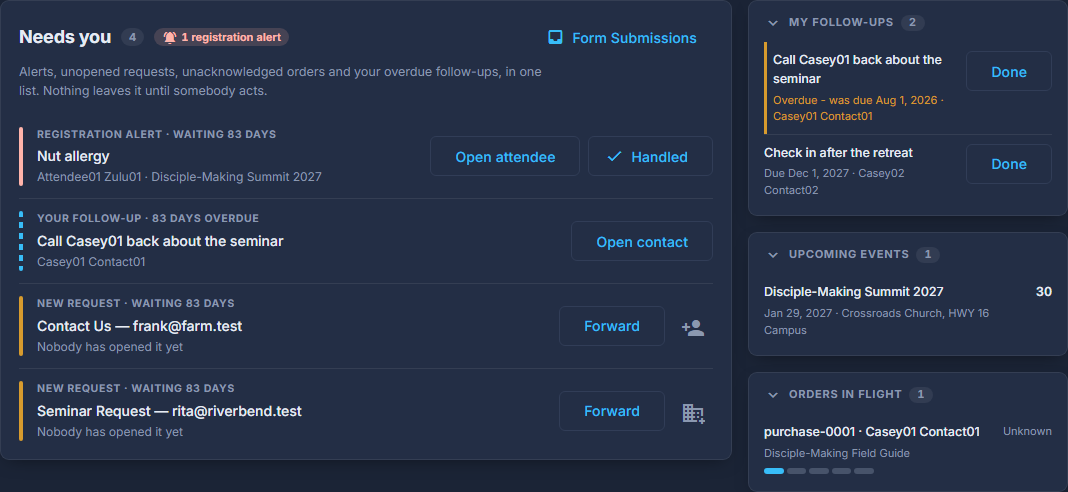
Open Home, at the top of the menu on the left.
It sits above the tabs, so it is one click from anywhere.
Read a row from the top: why it is here, what it is, who it concerns.
The first line says how long it has been waiting. The list is oldest first, so the top row is the one that has waited longest.

One row in "Needs you", and its buttons. Press the button on the row to deal with it.
The button says what it does: Open attendee, Forward, Open order, Open contact or Open page. A row leaves the list when the thing it is about is done, not when you look at it.
For a registration alert, press Handled once you have.
Alerts are the one kind you clear from here. Everything else clears itself when it is forwarded, acknowledged, marked done or put live.
For a request, press the add-person button to make a contact out of it.
The form is filled in from what they typed, for you to check before saving. A request that named a church offers an organization and its contact together.
The "Form Submissions" link beside the heading opens every submission, not only the unopened ones in the list.
A row that begins "Your follow-up" is yours alone: an overdue follow-up you own. Nobody else sees it on their Home.