A follow-up belongs to a person and to a member of staff. It is added on the contact's own screen, listed under My follow-ups on Home for whoever owns it, and joins Needs you once it is overdue.
The screens pictured here are an example ministry’s, so the names and figures in them are not yours. Everything they show works the same way in your own admin.
Open the contact, and find Follow-ups under their organization.
Type what you will do in "Follow up with this person about…", choose a date under By, and choose the Owner - the member of staff who will do it.
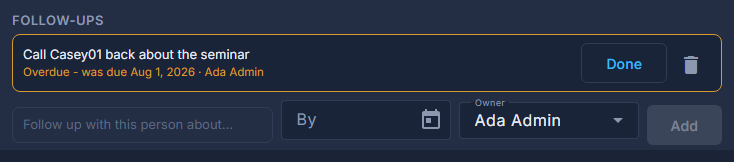
Adding a follow-up on a contact. Press Add.
It saves at once, without pressing Save on the contact.
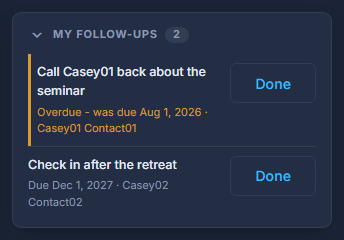
Open Home to see your own, under My follow-ups.
Only yours, and only the ones still open, late ones first. A late one has an amber edge.
Click a follow-up to open the person, or press Done when it is done.
A done one leaves the list; the contact's own screen still shows it under Follow-ups.
Give a follow-up to somebody else by choosing them as Owner. It goes on their Home when it is late, not yours.
The red trash can on a follow-up, on the contact's screen, deletes it. Done is the normal way to finish one; deleting is for one added by mistake.