A search result and a shared link show words and a picture that are not on the page itself. Left empty, the search engine writes its own line and a shared link shows the page's header photo, or nothing.
The screens pictured here are an example ministry’s, so the names and figures in them are not yours. Everything they show works the same way in your own admin.
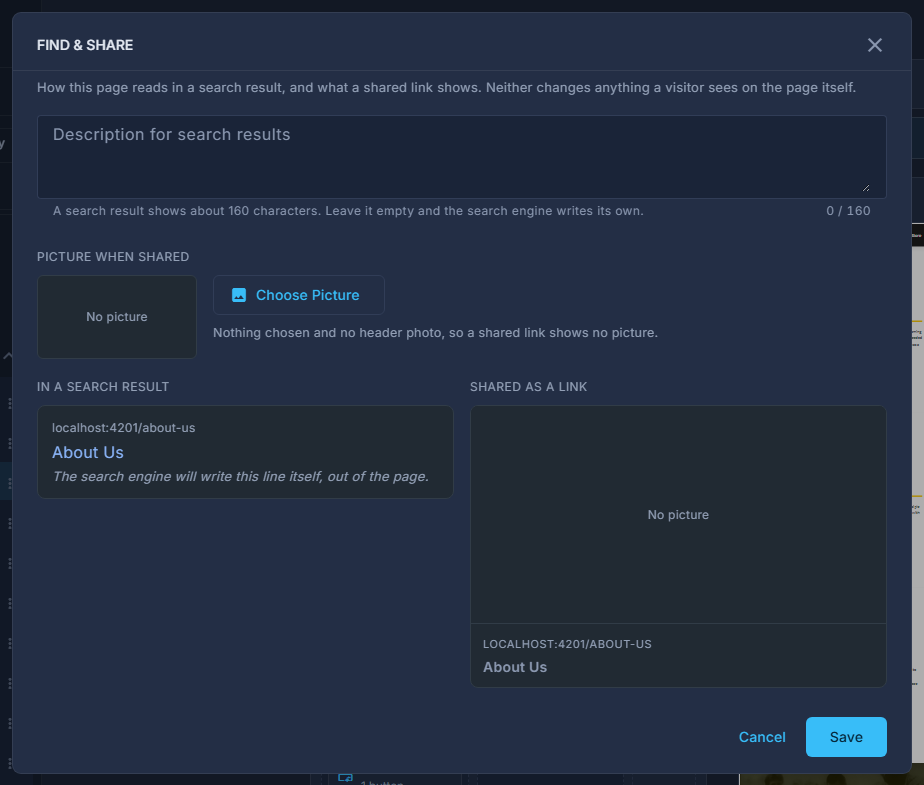
Open the page, press the button at the end of the page frame, and choose Find & Share.
Write the description for search results.
One sentence someone searching would recognise. A result shows about 160 characters; anything over is kept, and the preview shows where a result stops.
Choose a picture when shared, or leave it to use the page's header photo.
Wide pictures read best - about 1200 by 630. Remove goes back to the header photo.
Check both previews, then press Save.
Neither changes anything a visitor sees on the page itself, so there is nothing to publish afterwards. Publish reminds you when a page has no description yet, with Set It to open this.