Every order sends a receipt. A product can also send an email of its own to whoever bought it - a welcome to a course, a link to the next book - chosen on the product.
The screens pictured here are an example ministry’s, so the names and figures in them are not yours. Everything they show works the same way in your own admin.
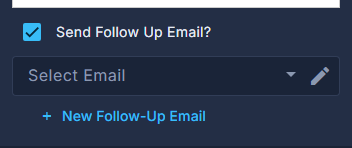
Open the product and tick "Send Follow Up Email?".
Choose the email under Select Email, or press "New Follow-Up Email" to write one.
Only follow-up emails are listed here, and this is the only place a new one can be made. The email designer opens; what you save there comes back into the list.
Press the pencil beside the field to change the email later.
It opens the same designer, without leaving the product.
Press Save.
To change the receipt every order sends, open the ☰ above the list and choose Order Receipt.
One receipt for the whole store. It is sent in the same moment the order is written.
The receipt cannot be changed for an order that already exists - it has gone by the time the order can be opened.