Everybody registering gives a first name, last name and email. Anything else you need is a question you add here, and it is asked once for every person registering - three tickets means three sets of answers.
The screens pictured here are an example ministry’s, so the names and figures in them are not yours. Everything they show works the same way in your own admin.
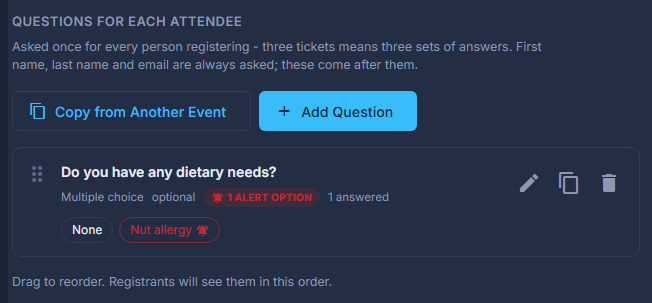
Open the event and press Questions on the strip.
Press Add Question.
Choose how they answer, then write the question.
Single choice and Multiple choice give Options to pick from - one, or as many as apply; Text is One line or a Paragraph. Help text (optional) is shown under the question.
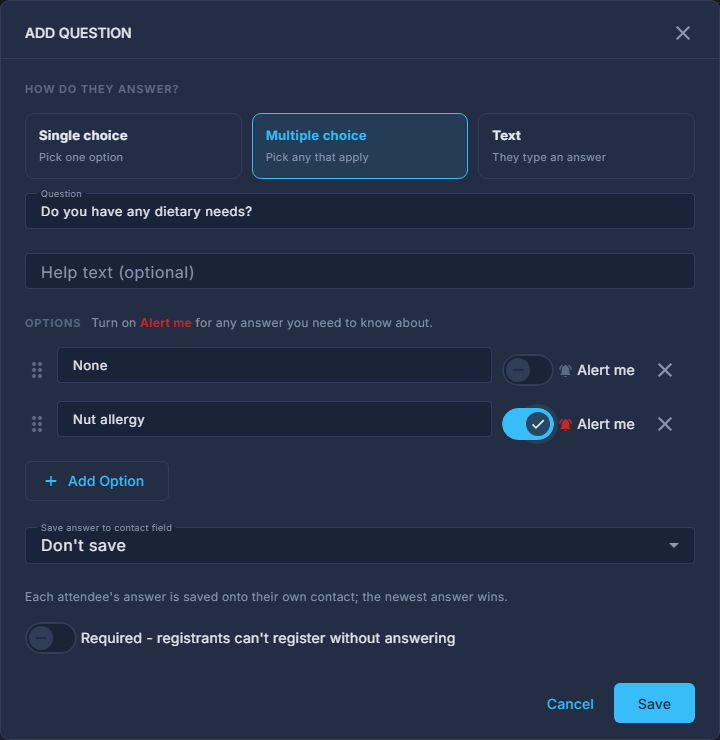
Add Question: the answer type, the options, Alert me and Required. Turn on Alert me for any answer you need to know about.
An answer that raises an alert is marked in red on the attendee list, waits on Home until somebody marks it handled, and Only people with an alert narrows the list to them. A typed answer cannot raise an alert - there is nothing fixed to match it against.
Turn Required on if somebody cannot register without answering.
Press Save on the question, then drag the questions into the order registrants will see them.
Save the event.
Questions are part of the event, so they are stored when you press Save at the top - there is no separate save for them.
Copy from Another Event brings a whole question set over from an event you have already run.
Save answer to contact field writes each answer onto that person's own contact record, where the newest answer wins.
Removing a question, or one of its options, keeps the answers people have already given. A removed option is listed under the question with Bring Back.