Cancelling is not the same as switching Live off. It refunds the money, closes the registrations, clears the waiting list and emails everybody your message - in one run you can watch.
The screens pictured here are an example ministry’s, so the names and figures in them are not yours. Everything they show works the same way in your own admin.
Open Back Office, then Events, then Events, and open the event.
Open the ☰ at the top right and choose Cancel Event…
Only a full-access admin has this menu.
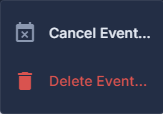
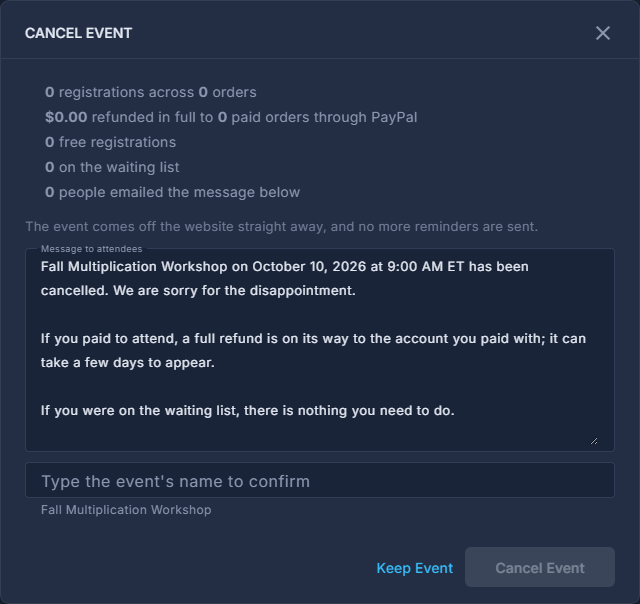
The ☰ at the top: Cancel Event…, and Delete Event… in red. Read what it says cancelling would do.
How many registrations and orders, how much is refunded and to how many paid orders, how many are free, how many are waiting, and how many people will be emailed.
Write the Message to attendees.
This is what they receive. It is the only explanation they get.
Type the event's name to confirm, then press Cancel Event.
Keep Event, beside it, closes the pop-up and changes nothing.
Come back to the same menu, now reading Cancellation…, to see how it went.
It shows what was refunded, what is still queued, and any refund that failed. Retry Failed Refunds tries those again.
This refunds real money and sends a real email to everybody registered. Neither can be undone, and the event comes off the website straight away.
An order that also bought other things is not refunded here - refund the event part of it from the purchase itself. The screen lists which orders those are.
Delete Event… is in the same menu, drawn in red like every delete, and it refuses while the event has registrations - the menu says why. Cancel it instead: deleting takes the registrations with it.