A reminder goes out by itself the day before, to everybody registered, so nobody has to remember to send it. A follow-up can go out after the event ends, with a survey if you have one.
The screens pictured here are an example ministry’s, so the names and figures in them are not yours. Everything they show works the same way in your own admin.
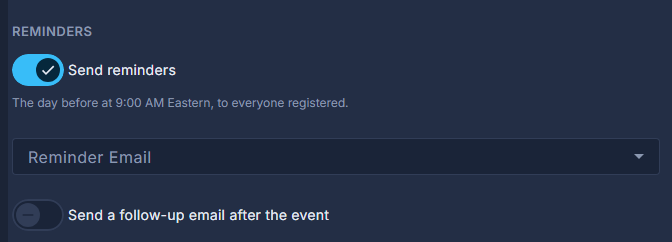
Open the event and press Reminders on the strip.
Turn Send reminders on.
It goes the day before at 9:00 AM Eastern, and for an online event an hour before it starts too. Reminder Email chooses the template; left on Default reminder, a plain one is sent.
Turn on Send a follow-up email after the event, if you want one.
When says how long after it ends. Follow-up Email chooses the template. Survey link is shown as a button where the email places *|SURVEY_LINK|*. For an in-person event, Only people who checked in at the door narrows it to those who came.
Read the lines under the switches.
They say what has already gone out for this event, so you can tell a reminder that was sent from one that is still due.
Press Save.
A reminder goes to everybody registered at the time it is sent. Cancelling the event stops any still due.