The campaign sets the audience, and every email in it uses that unless you give one email an audience of its own. Getting the campaign's right is most of the job; the per-email override is for the exception.
The screens pictured here are an example ministry’s, so the names and figures in them are not yours. Everything they show works the same way in your own admin.
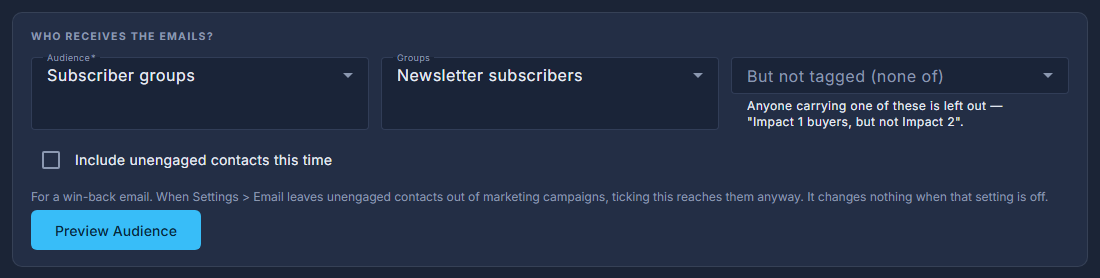
Open the campaign, open the ☰ at the top and choose Edit Campaign.
Under WHO RECEIVES THE EMAILS, choose how the audience is decided.
Everyone (all contacts), Subscriber groups (newsletter or prayer team), Tagged contacts, a Saved segment, or Specific emails - addresses you type in.
Use "But not tagged" to take people back out.
"Impact 1 buyers, but not Impact 2" is two choices here, not a new segment.
Press Preview Audience.
Anybody who unsubscribed is already out of that number, and so is anybody it has no "yes" from - a contact created by a purchase or a registration has never been asked. So it is what would really be emailed; for a segment it is today's answer, not a fixed list.
Press Save Campaign.
One email can go somewhere else. Open that email, press Send, and the top of the panel says who it would reach and lets you pick a different saved segment for this email only. Everything else in the campaign carries on using the campaign's audience. It is worth knowing two emails in one campaign can have different audiences, because the list and the campaign both show the campaign's.
The number in the Confirm Send box is the number that will actually be sent to - this email's own audience where it has one, the campaign's where it does not. Read it before you press Send; it is the last point at which anything can be changed.
Tick "Include unengaged contacts this time" only for a win-back email. It changes nothing unless your settings are leaving unengaged contacts out of marketing campaigns.
A segment is asked again at every send, so a later email in the same campaign can reach a different number of people from the first one.