The Newsletters page lists newsletter emails you have chosen to show there, newest first, each readable in full. The Monthly Newsletter campaign is where that is decided: its rows are tagged BOTH when an email is on the page and EMAIL when it is not.
The screens pictured here are an example ministry’s, so the names and figures in them are not yours. Everything they show works the same way in your own admin.
Open Back Office, then People, then Campaigns, and open Monthly Newsletter.
Its header says "Posts to the Newsletters page".
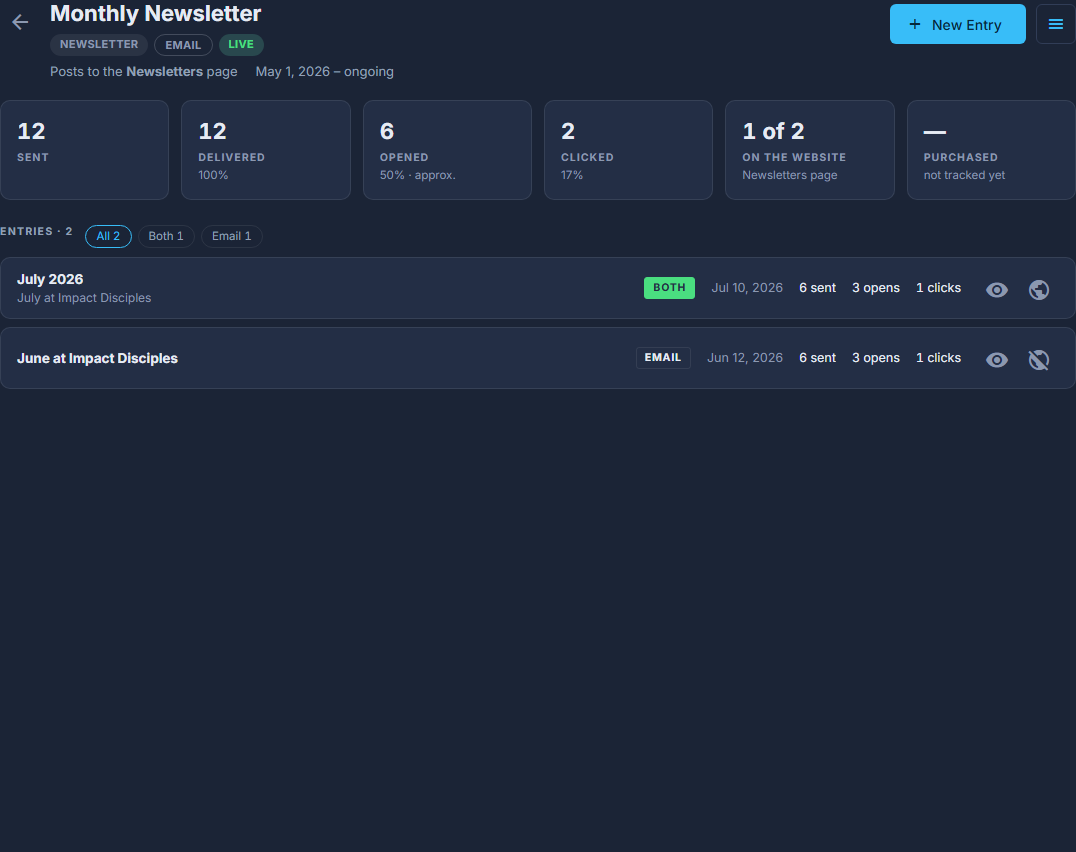
Monthly Newsletter: BOTH is on the Newsletters page, EMAIL is not. The globe on the right of a row changes that. For a new one, press New Entry, keep Website and email, and press Next: Write It.
It goes on the page as soon as it has been sent. Email only sends it and leaves it off.
For one already sent, press the globe on its row.
The pop-up is called SHOW ON WEBSITE: turn "On website" on or off, give it a Public title if the subject line is not right, and press Save. Only the title, the date and the body are published - never who it went to or how it did.
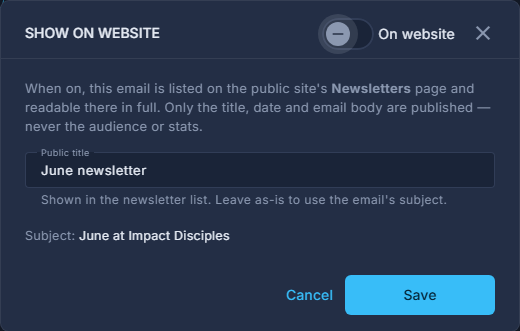
SHOW ON WEBSITE: the On website switch at the top, the Public title, then Save.
A newsletter sent from the Subscriber report has a box for this on the way out: "Also show this on the website's Newsletters page".