A word on the day has to reach people where they are. This sends it as a notification to every phone that has the event app and said yes, and as an email to everybody else in the group - so everyone is told, and nobody twice.
The screens pictured here are an example ministry’s, so the names and figures in them are not yours. Everything they show works the same way in your own admin.
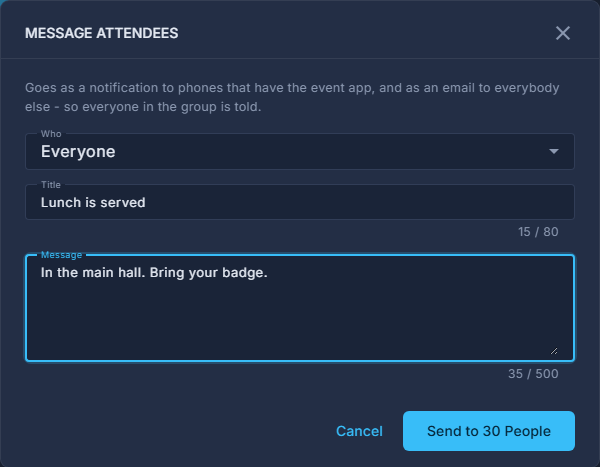
Open the summit's Command Center and press Message Attendees, beside the registration count.
Choose Who.
Everyone; by check-in - checked in, or not yet; one breakout; or everybody who gave one answer to one of your questions.
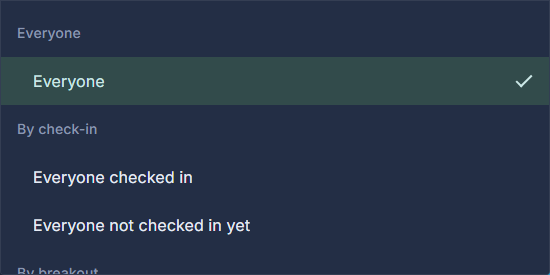
The groups you can message. Write the Title and the Message.
A lock screen's worth: 80 characters and 500. The same words go in the email.
Read the number on the button, then press Send to ... People.
The count is asked of the server for the group you chose, and there is nothing to press until it has answered. Nobody in That Group means exactly that.
Find it afterwards under Messages sent.
Newest first: the words, the group, who sent it, how many by notification and how many by email. It appears on the Command Center once one has gone.
It goes the moment you press the button - to real phones and real inboxes - and cannot be called back. An event that is not live (for a summit, not at Early Bird or Open), or is cancelled, messages nobody.
The email half shares the hourly sending limit with reminders. Anybody it could not reach in time is counted in the log as NOT emailed, never dropped quietly.
A parent with the app who registered three people gets the notification for their own registration and the email for the other two.