A summit is announced before it sells, and sells to early birds before everybody. Its stage says which of those it is doing, and one move changes the website and what is on sale together.
The screens pictured here are an example ministry’s, so the names and figures in them are not yours. Everything they show works the same way in your own admin.

Open Back Office, then Events, then Summit, and double-click the summit.
Read the track in the header: Draft, Coming Soon, Early Bird, Open.
Draft: only staff can see it. Coming Soon: the Summit link in the site's header and the Coming Soon image. Early Bird: the Coming Soon image with an Early Bird Registration button. Open: the full Summit page, and anyone can register.
Press Move to the next stage - or press any stage on the track.
A pop-up asks "Move … to …?" and says what changes on the Website and in what is Selling. Press the move to make it, or Cancel.
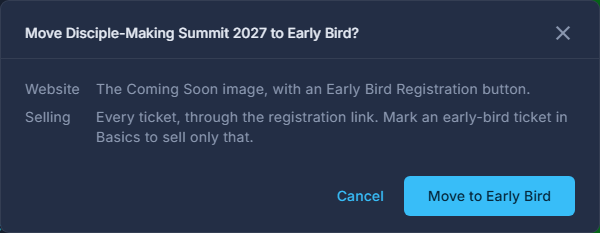
The move, and what it changes, before it is made. Before Early Bird, mark the early-bird ticket under Basics.
A ticket with "Early bird price for" set is the only one sold at Early Bird, until its date. With none marked, every ticket sells through the registration link.
Set the Coming Soon image on Public Page.
It is what the Summit page shows until you move to Open. Left blank, the hero image is used.
A move changes the public website at once. When the early bird's date passes at Early Bird, nothing sells until you Move to Open - the summit says so at the top.
Open is what the Summit list calls Live, and what lists the summit on the event app's front door.