A testimonial is a record, not part of any one page: the same quote can appear on Home, on Seminars and in a quote carousel on a page you made. Its words live here; a page only chooses which ones to draw and in what order.
The screens pictured here are an example ministry’s, so the names and figures in them are not yours. Everything they show works the same way in your own admin.
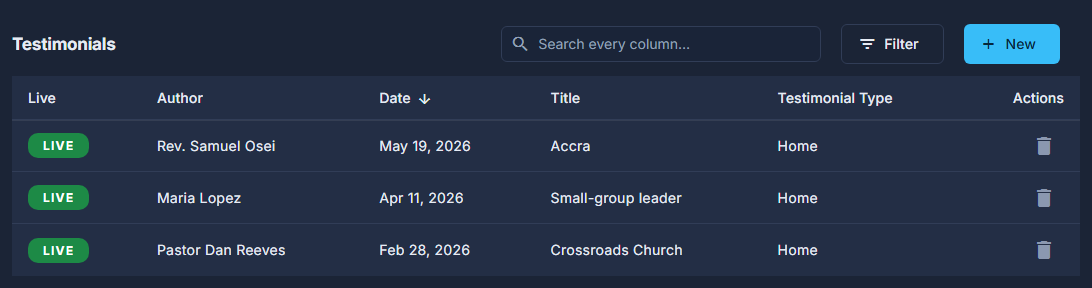
Open Site, then Testimonials.
Press New, or double-click a row to open it.
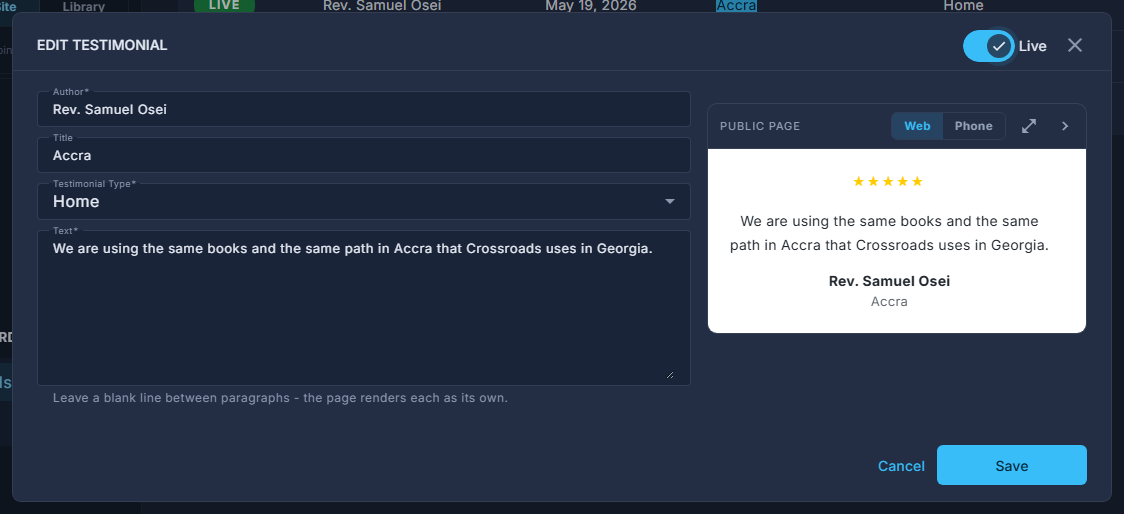
One testimonial open: Author, Title, Testimonial Type and Text, drawn on the right as the page shows it. Fill in Author, Testimonial Type and Text; Title is optional.
The type says what it is about - Home, Seminars, Equipping Groups or Coaching with Impact. A page's list of quotes shows the types ticked under its "Show Quotes About", and Customer Reviews shows every type. The preview follows the type. Leave a blank line between paragraphs.
Switch it Live in the pop-up header, and press Save.
A testimonial that is not live is kept but drawn nowhere.
The trash can deletes the testimonial for good, off every page that draws it. To hide one for a while, switch it off instead.