The Team page on the site is built from these records - one per person - and the Team member element on any page draws from the same list. Only the page's header is designed in Pages; the people are here.
The screens pictured here are an example ministry’s, so the names and figures in them are not yours. Everything they show works the same way in your own admin.

Open Site, then Team Page.
Press New, or double-click a row to open it.
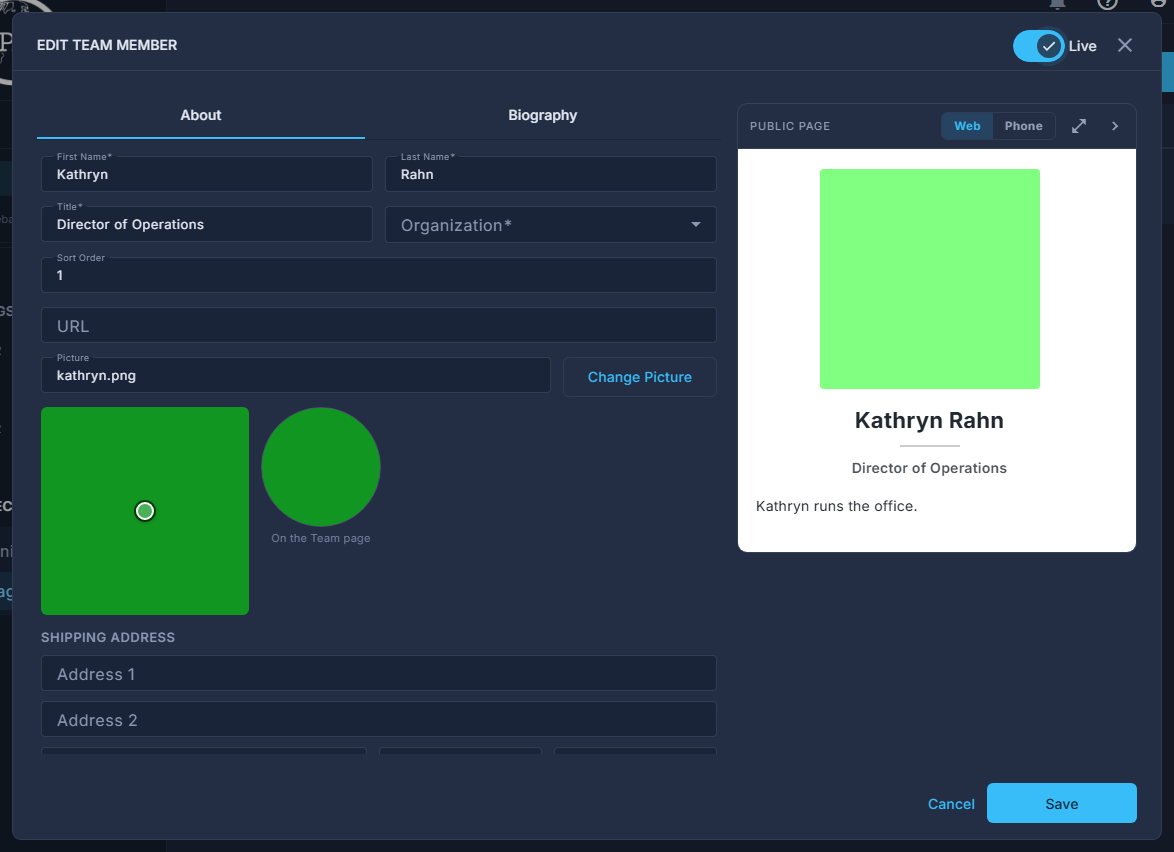
One team member open: the About tab, and the public page drawn on the right. Fill in First Name, Last Name, Title and Organization; give them a Sort Order.
Sort Order is the position on the page - lowest first. URL is an optional link for their name.
Upload Picture, then drag the circle to the part of the headshot that stays in it.
The Team page draws every headshot in a circle, so a face off-centre is cropped away. The circle on the form is where that is chosen.
Write the Biography on its own tab.
Rich text; the preview shows it as the page will.
Switch them Live in the pop-up header, and press Save.
Shipping Address and Phone Number are for the office - where to send a team member's books - and never appear on the site.