Provisioning builds a ministry’s whole operation in one run: its Google project, its database, its sign-in, its storage, its hosting, its secrets, its configuration, and a first deploy of every app it is getting. It takes about half an hour and you do not have to watch it.
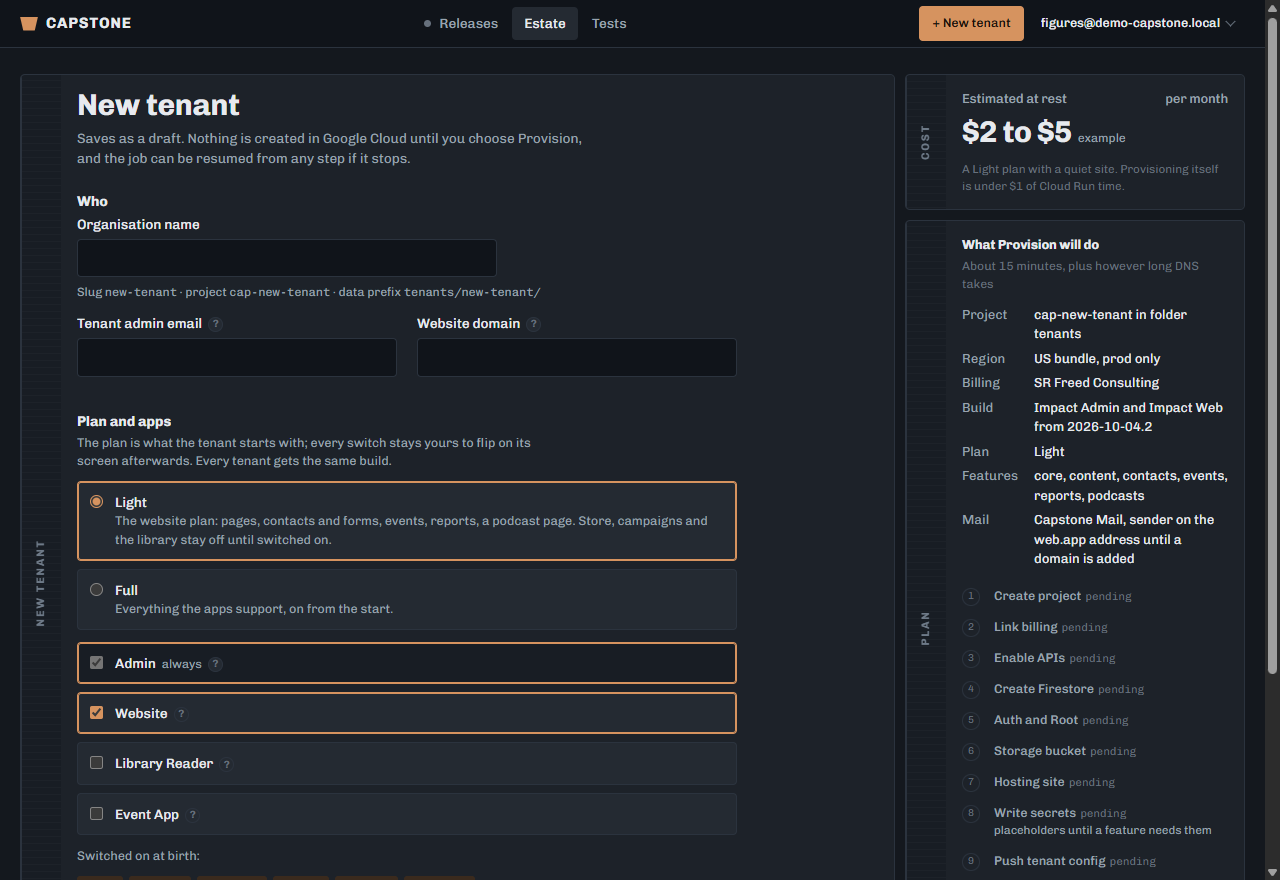
Open New tenant.
From the Estate, or from a parent tenant’s screen for a second-tier customer.
Give the organisation’s name.
What the ministry calls itself. It becomes the name on its records and the default wording in its apps.
Give the tenant admin’s email.
The person who will run the ministry’s admin. They get the Admin role and an invitation once the tenant verifies. You stay Root; the Admin role is theirs, not yours.
Give the website domain, if they have one.
Optional at this point. Leave it blank and the apps answer on their .web.app addresses until you attach a domain later.
Choose the plan and the region bundle.
The plan sets what they are charged and what they may use. The region decides where their records physically live, and it cannot be changed afterwards.
Choose which applications they get.
Admin, website, reader, events — each one is a separate build and a separate cost.
Read "What Provision will do", then press Provision.
It lists exactly what is about to be created. This is the last point at which nothing has been built.
The region bundle is permanent. Moving a ministry’s records to another region later means exporting and re-provisioning, not a setting.
The tenant admin’s invitation is only sent once the tenant verifies, so a typo in the address is recoverable — change it on the Client panel before verification.