Capstone SR Freed Consulting

Your ministry gets a platform, not a project.

Capstone stands up a ministry's entire digital operation — public website, back office, a reading app for your own published material, and an app for the people at your events — on cloud infrastructure we build, own, and keep running. You get the login. We keep the pager.

Issued by
SR Freed ConsultingVendor of record
Applications
FourWebsite, admin, reader, event app
Capabilities
ThirteenSwitched per ministry
Status
In serviceThree ministries live
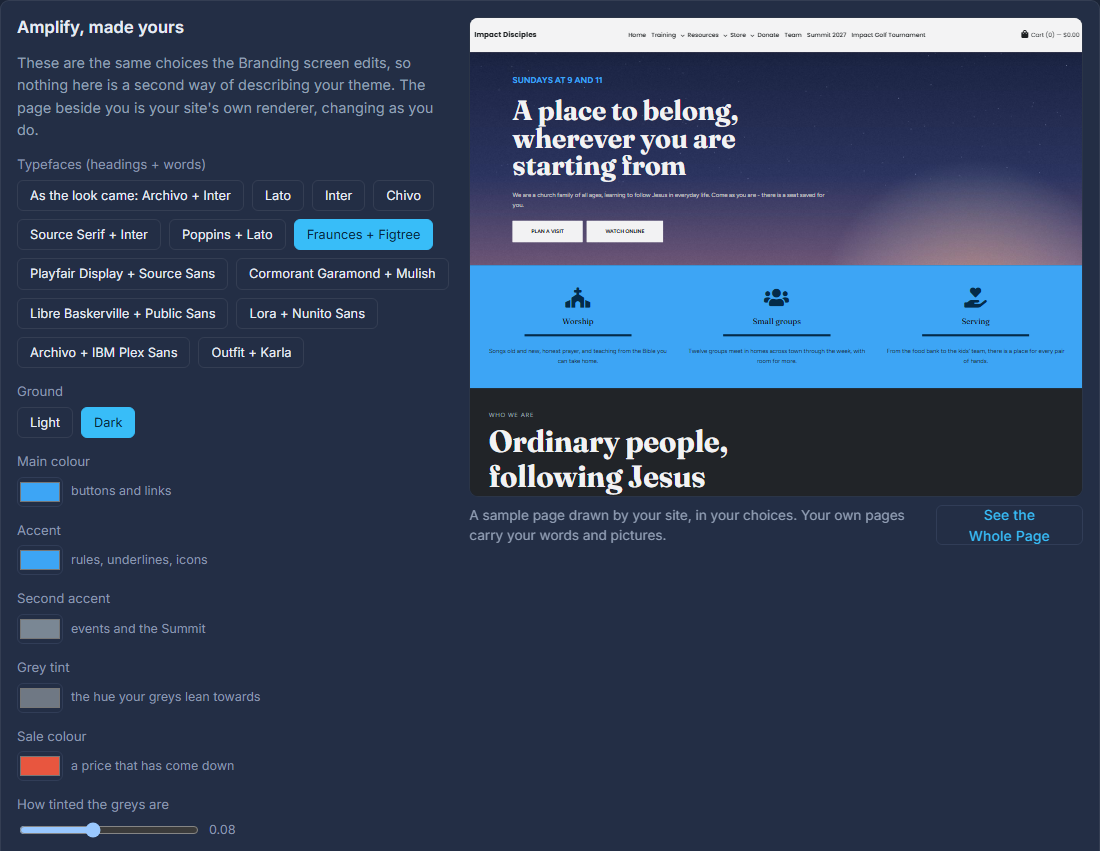
The admin's Make it yours screen: brand seeds on the left, the ministry's own site redrawing on the right
You edit against a live preview of your own site, save drafts that change nothing public, and publish when it looks right.

Most small ministries are running six products and a volunteer.

Nobody chose this. It accumulated. Every tool was reasonable on the day it was added, and together they cost more than anyone adds up.

A website builderMonthly, per site. Nobody remembers the password.
An email toolIts contact list disagrees with every other list.
An events productTakes a cut of every registration.
A storefrontSeparate customers, separate orders, separate tax.
A spreadsheetThe actual system of record, and everyone knows it.
A volunteerWho built it, and has since moved away.

Six bills, six logins, and no single place where a person who gave, registered, subscribed and bought is one person.

One multi-tenant platform. Every ministry gets its own isolated slice of it.

Capstone is a platform-as-a-service control plane. Underneath it is one engineered codebase — a content management system, a contact and forms database, an events manager, a commerce engine, a campaign and email pipeline, and a digital library — built once, hardened once, and improved for everyone at the same time.

On top of it, your ministry gets its own account with Google, its own database and its own storage, under your own domain. Not a folder in a shared account. Your people's records are never in the same place as another ministry's.

And it is done for you. Nobody at a ministry ever sees Capstone itself. Our team runs the provisioning, the domains, the releases, the certificates, the backups and the upgrades. What the ministry gets is a working website and a plain-English admin panel with their own logo on it.

You are live on day one on a seeded starter site, with real pages already in place. Then you make it yours.

Four apps, and you choose which ones you need.

The admin is always built. The public website, the Library Reader and the event app are chosen per ministry, and a capability that needs an app it doesn't have simply isn't offered.

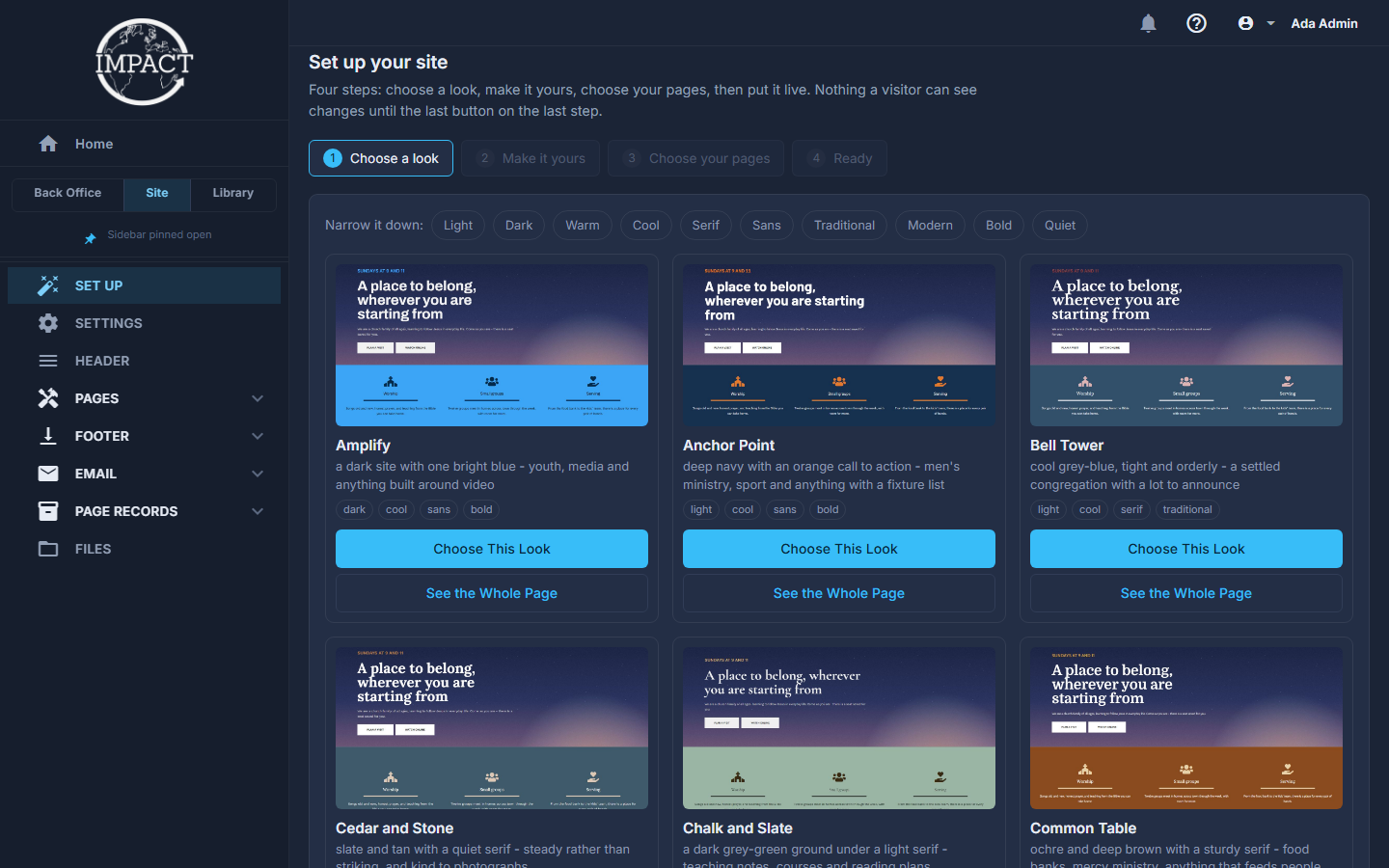
The admin's Set up your site screen: choosing one of the ready-made looks
You are live on day one on a seeded starter site, with real pages already in place. Then you make it yours.

The Admin

Always built

The back office. Staff and roles, contact records, the form builder and its submissions, events and registrations, campaigns, reports over your own data, and the library manager. Delegated access means a volunteer can be granted exactly one page and nothing else.

Used by: staff and volunteers
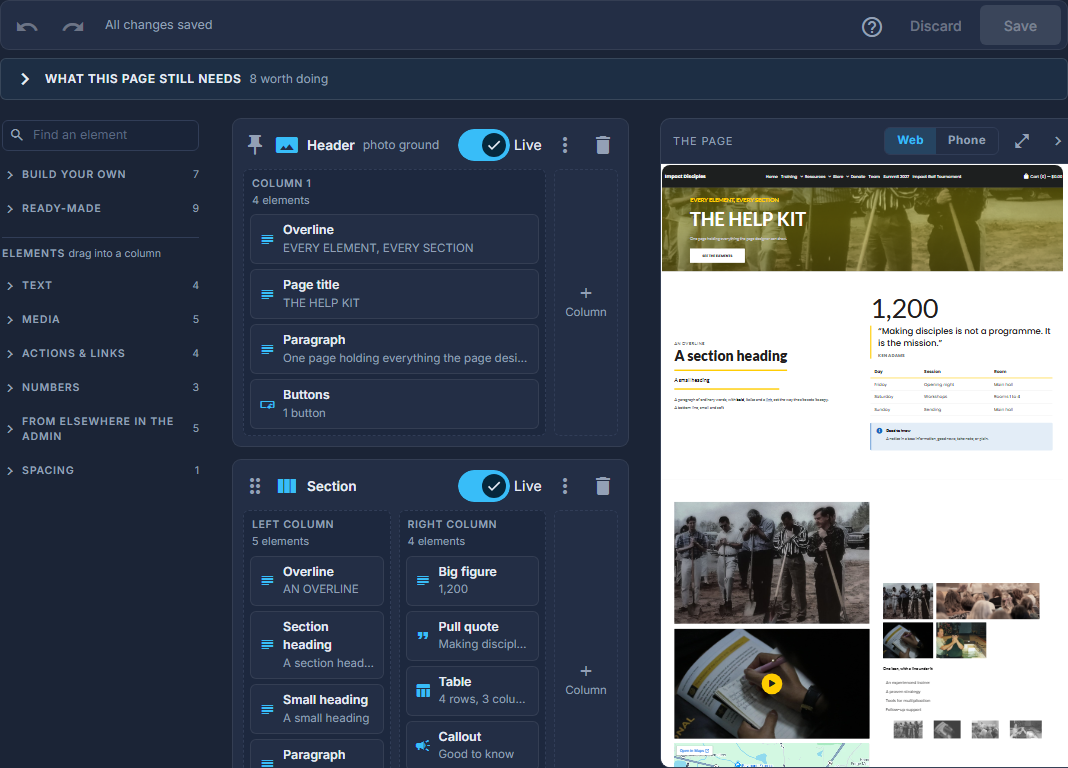
The Page Designer: the structure rail on the left, the element library, and the live page preview
Every page is a stack of content sections edited in the admin — no developer, no deploy, no ticket.

The Website

Optional

Your public site. Every page is a stack of content sections edited in the admin — no developer, no deploy, no ticket. Home slider, forms that belong to the page they sit on, a podcast page fed straight from your YouTube playlist, a newsletter, and a store with real checkout when you want one.

Used by: everyone you serve
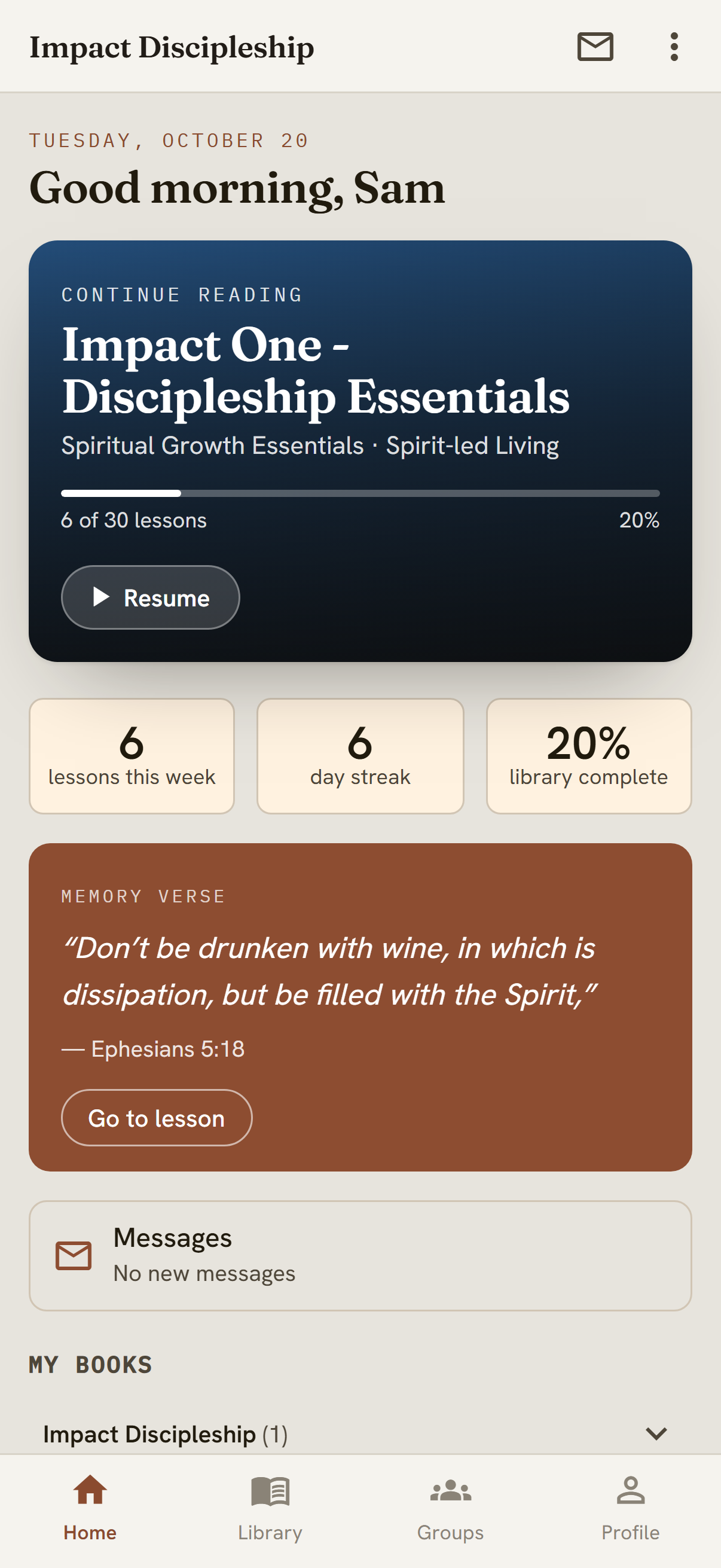
The Library Reader on a phone: the home screen with today's reading
On the web, and on Android through the Play Store.

The Library Reader

Optional

A reading app for material you have written — books, studies, curriculum — published from the admin, with highlighting and progress that follow the reader across devices. On the web, and on Android through the Play Store.

Used by: your readers and cohorts
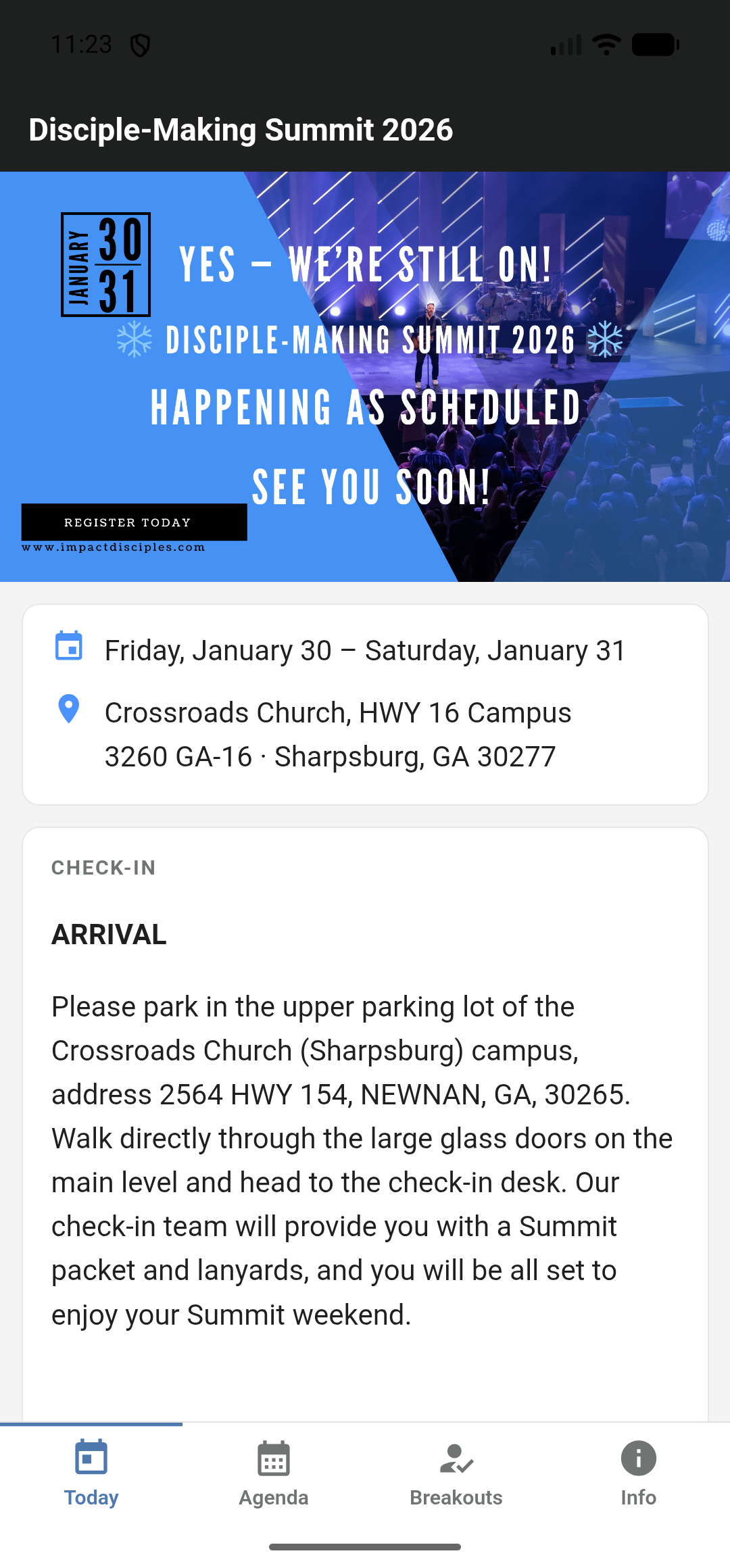
The event app on a phone: the Today screen for a summit
An app for the people at your event.

The Event App

Optional

An app for the people at your event. What is on now and what is next, the full agenda and the breakouts they chose, where it happens, dining, check-in on arrival, and the questions people always ask — all of it written in the same admin that takes the registrations, so there is no second system to keep in step. On Android through the Play Store today; iOS is in progress.

Used by: the people attending

Thirteen capabilities. Switched on per ministry, changed whenever you ask.

A plan decides what you are born with, not what you are allowed. Every switch below is free to flip afterwards — there is no upgrade wall and no second build. The one add-on is AI writing help: it runs on your own provider key and is billed at exactly what that provider charged, with nothing added.

Capability In market terms What it gives you Needs Light
Core Identity & access Sign-in, staff, roles and delegated permissions. Always on. — Always
Content CMS Site pages built in a visual designer, with a live preview, a home slider and a section library. Website Included
Contacts CRM Contact records, the form builder, saved segments, follow-up tasks, fields of your own, and every submission attached to the person who sent it. Export or erase a person's data on request. — Included
Events Registration Events manager and registrations: several kinds of ticket with caps, your own registration questions, reminders before and a follow-up after, door check-in and a waiting list — with no per-ticket cut taken by anyone. — Included
Flagship Event Conference management Your one big event of the year, with its own editor, stages, agenda, breakouts, command centre and public page. You name it — Summit, Conference, Gathering — and choose its address. Website On request
Reports Analytics Report screens over the ministry's own data, plus per-tenant visitor analytics. — Included
Podcasts Media A podcast page on the site, fed from the ministry's own YouTube playlist. Website Included
Newsletter Publishing A newsletter on the site, written in the admin. You name it and pick its address. Website On request
Automatic emails Transactional email Every automatic email a ministry sends — receipts, confirmations, welcomes, reminders — editable in plain words, on one letterhead you set once. — Included
Campaigns Marketing automation Campaign manager and the send pipeline, targeted at the contacts you already hold: saved segments, subject-line tests, automatic suppression of bounces and complaints, one-click unsubscribe, and a letterhead you draw once. — On request
Store E-commerce Product catalogue, cart and checkout, PayPal, live shipping rates and sales tax, coupons, refunds, batch shipping labels and affiliate commissions. — On request
Library Digital publishing Library manager in the admin, publishing your titles straight to the Reader. Import a book from a PDF, and look after the groups reading together. Reader On request
AI writing help AI assistance Subject lines for an email, Rewrite on any words you have written, and a first draft of a page from a description or from a PDF you already have. Your own key Add‑on, at cost

Set twelve colours. The system derives the other fifty.

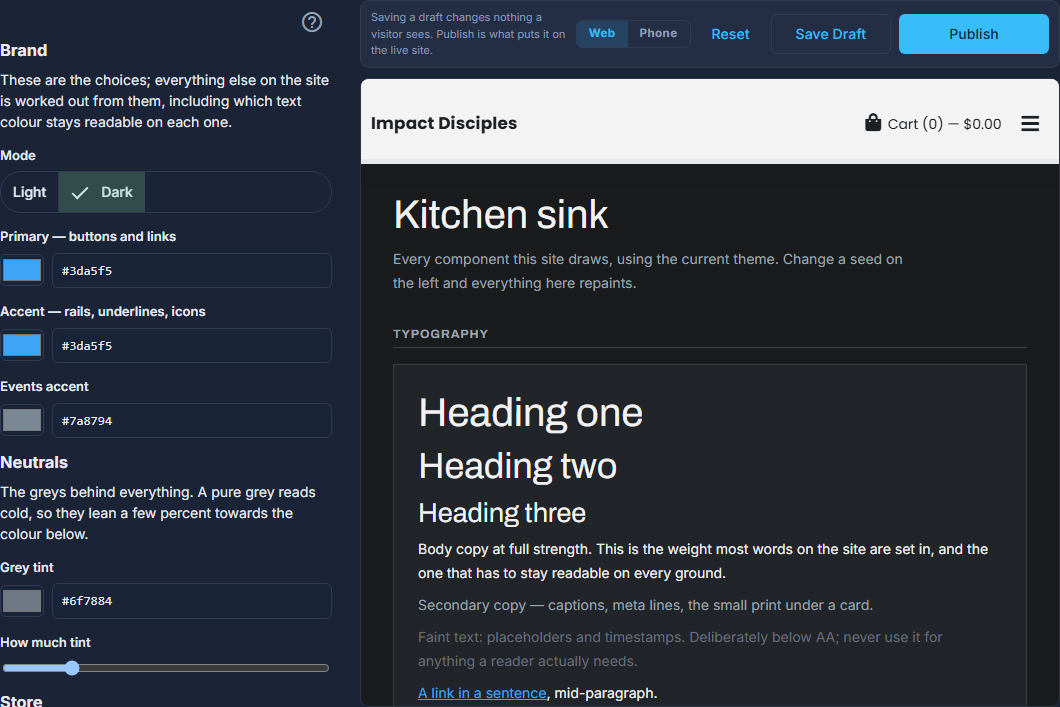
A ministry's brand is entered once, as twelve seed values and a type pairing. From those, the platform derives roughly fifty design tokens — button fills, link text, borders, surfaces, muted states — and checks the contrast of every one of them as it goes. A brand colour that works as a button but fails as body text gets corrected automatically rather than shipped unreadable.

You edit against a live preview of your own site, save drafts that change nothing public, and publish when it looks right. It is the difference between picking a theme and having a brand.

Brand settings in the admin, with a live kitchen-sink preview of every control beside them
A brand colour that works as a button but fails as body text gets corrected automatically rather than shipped unreadable.

One form, thirteen steps, a whole cloud estate.

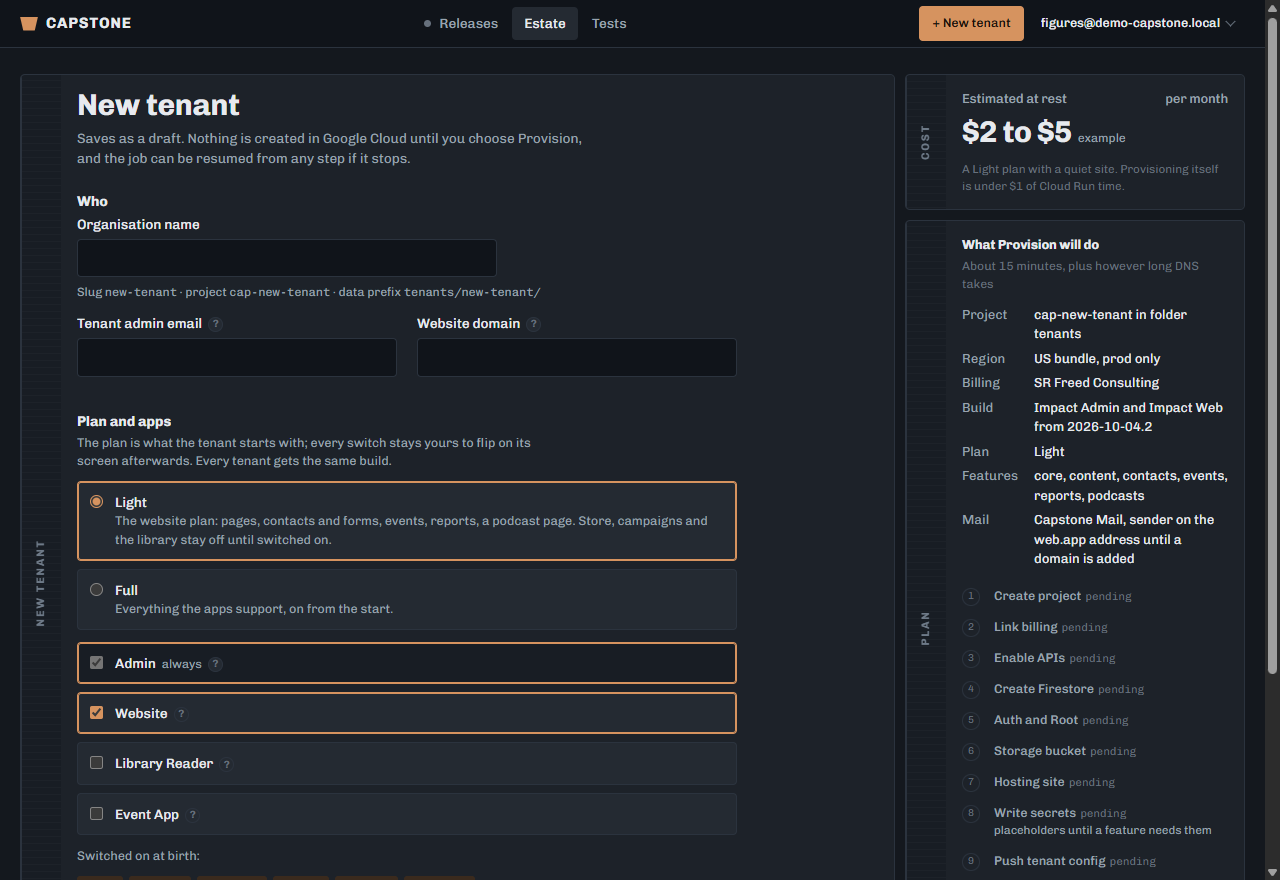
This is the part nobody else does for a ministry your size. From a single record — name, domain, plan, capabilities — an automated worker builds the entire footprint. Each step is checkpointed, so a run that stops can resume exactly where it stopped rather than starting over.

The Capstone console's New tenant form, with the provisioning plan listed beside it
From a single record — name, domain, plan, capabilities — an automated worker builds the entire footprint.
  1. Step 01

    Create project

    A dedicated Google Cloud project, owned and governed by us.

  2. Step 02

    Link billing

    Ours by default; your own billing account if you'd rather.

  3. Step 03

    Enable APIs

    Only the services this ministry's chosen capabilities actually need.

  4. Step 04

    Create database

    Your own Firestore instance in your chosen region.

  5. Step 05

    Auth and owner

    Sign-in, and the first administrator account handed to you.

  6. Step 06

    Storage bucket

    Private file storage for images, documents and published titles.

  7. Step 07

    Hosting sites

    A public site and an admin site, each with managed certificates.

  8. Step 08

    Write secrets

    Every credential generated into your own secret manager, never shared.

  9. Step 09

    Push configuration

    Your capabilities, brand and settings pushed into the tenant.

  10. Step 10

    Build and deploy

    Your apps built from a pinned platform release and shipped.

  11. Step 11

    Attach domain

    We show you the exact DNS records. The job waits here — deliberately — until your domain answers.

  12. Step 12

    Verify

    An automated check that every piece actually responds before we call it live.

  13. Step 13

    Set alarms

    Uptime checks and Google-side alerts on your project, so a problem reaches us even if our own email is what broke.

Step 11 is the only place a human is in the loop, and that is on purpose: your domain belongs to you, so the records are yours to add. Everything before and after it is automated, repeatable, and identical for every ministry — which is precisely why we can afford to do it for ministries that couldn't otherwise pay for it.

Upgrades work the same way. Every tenant is pinned to a numbered platform release, and moving one forward is a job, not an outage.

A ministry inside a ministry, at a quarter of the bill.

Ministries grow arms — a coaching practice, a regional chapter, a conference, a publishing imprint. Each one wants its own website, its own name and its own front door, and none of them wants to be a separate organisation.

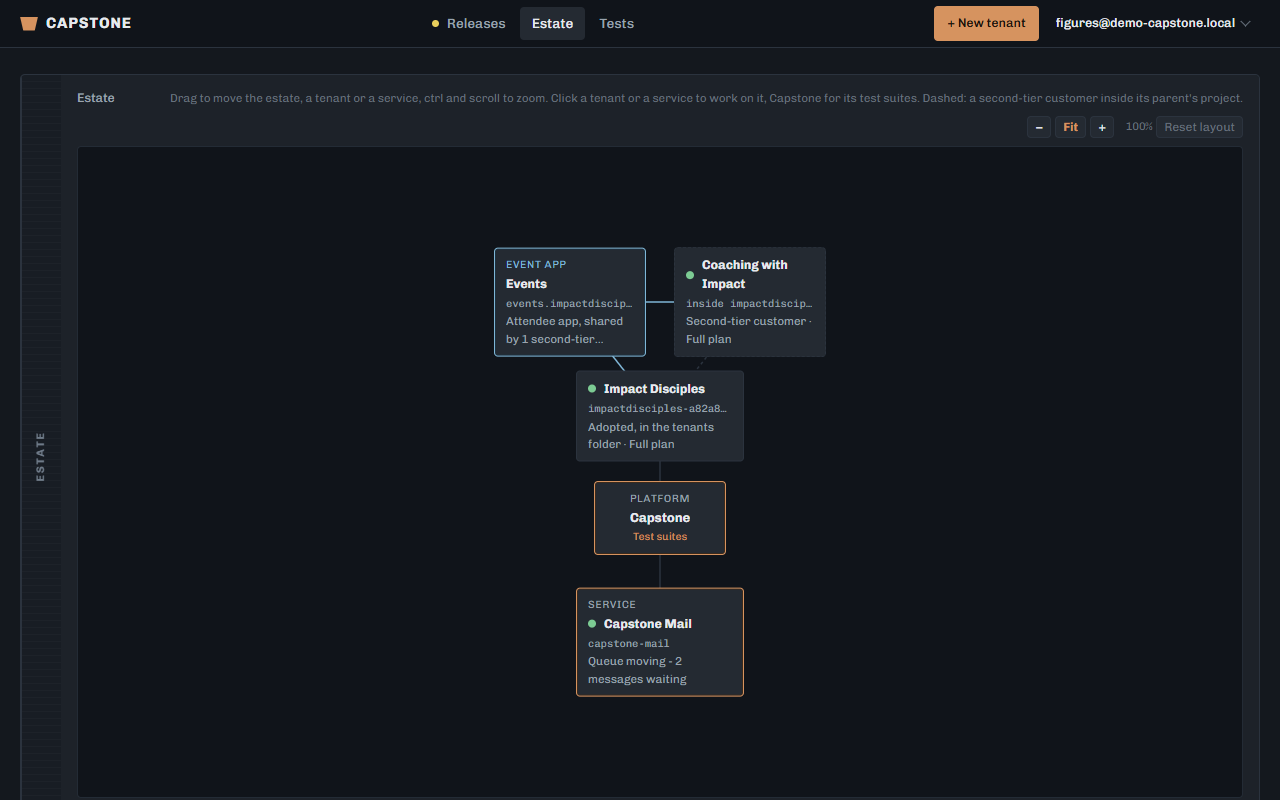
A second-tier customer is a full tenant in every way that shows: its own address, its own look, its own pages, its own staff and its own admin panel. What it shares is the plumbing underneath — the project, the database, the payment and shipping setup — which is why it costs $39 a month rather than a platform of its own, and why it arrives on the parent ministry's invoice instead of starting a new one.

It can even sell. A second-tier customer picks products from the parent's catalogue and sells them through its own storefront, on the parent's payment and shipping setup, with every order attributed back to where it came from. The selection is enforced at checkout, not just hidden in the storefront — a product that wasn't offered cannot be bought.

And it isn't a trap. A second-tier customer that outgrows the arrangement is lifted out into its own project when it's ready.

First-tier customer
The ministry Its own cloud project, database, storage, sign-in and domain. Fully isolated from every other tenant on the platform.
OWN PROJECT OWN DOMAIN OWN DATA
A second-tier customer Lives inside the parent's project. Its own website, its own admin, its own domain and its own brand — sharing the parent's infrastructure, billing and payment setup.
OWN SITE OWN ADMIN OWN BRAND SHARED PLUMBING
The console's estate map: Coaching with Impact drawn inside Impact Disciples
A second-tier customer that outgrows the arrangement is lifted out into its own project when it's ready.

A plan is where you start, never a ceiling.

Both plans are the same platform and the same build. The difference is what's switched on the day you open it. Nothing is withheld to sell back to you later.

No contract. The plan fee above covers the platform: every capability in it is switched on by asking, not by upgrading, and you can leave whenever you like. On top of it we pass on what your ministry costs to run — the cloud your site, data and files actually use — itemised on your invoice, at what Google charged us, with no margin unless we have agreed one with you. For most ministries that is a few dollars a month. AI writing help (suggested subject lines, rewrites, book import) is an optional, paid add‑on, off unless you ask for it, because every use of it costs real money to run; it is billed at exactly what the provider charged, with nothing added. Any line of it can be waived, and we say so on the invoice when it is. Getting started — moving your content across, pointing your domain, training whoever runs it — is quoted once we have seen what you are moving, because a five‑page site and fifteen years of archives are not the same job.

And if the money genuinely is not there, ask anyway. We grant this outright to ministries we believe in. That is a decision we would rather make with you than hide behind a discount code.

Light

$99a month

The website plan. For a ministry that needs to be findable, contactable and organised.

  • Public website and admin
  • Pages, sections and home slider
  • Contacts and the form builder
  • Events and registrations, with the event app for your attendees
  • Reports and visitor analytics
  • A podcast page
  • Receipts and confirmations you can reword, on your own letterhead

Store, campaigns, newsletter and library stay off until you want them. Then we switch them on.

Full

$149a month

Everything the platform supports, on from the first day.

  • Everything in Light
  • Store, checkout, shipping and tax
  • Campaigns and the send pipeline
  • Newsletter
  • Library Manager and the Reader app
  • Second-tier customers under you

The same price whatever your size — a ministry of six and a ministry of six thousand pay the same plan fee. What differs is the cloud underneath, which is billed at what it costs.

Second‑tier

$39a month

A ministry inside a ministry. For the arm that needs its own front door, not its own organisation.

  • Its own website, admin and domain
  • Its own brand and its own staff
  • Sells from the parent's catalogue
  • Runs on the parent's payment setup
  • Lifted out to its own project when it outgrows this

Added under a first‑tier ministry, billed to that ministry. It shares the plumbing underneath, which is why it costs a quarter of a tenant of its own.

We run our own work on it.

Capstone is not a pitch deck. Three ministries are live on it right now, on the same release, and two of them are the second-tier arrangement described above.

Impact Disciples

Live First-tier Full plan

Website, admin and the Library Reader. Store with live shipping and tax, campaigns, events, a podcast page, a newsletter, and a published library reaching readers on the web and on Android.

Coaching with Impact

Live Second-tier Light plan

A coaching practice running inside Impact Disciples' project with its own site, its own admin, its own brand and its own domain — provisioned end to end from the Capstone console, and selling from the parent's catalogue.

Impact Missions

Live Second-tier Light plan

A missions ministry running inside Impact Disciples' project with its own site, its own admin, its own brand and its own domain — provisioned end to end from the Capstone console, with events and registrations, contacts, a podcast page and reports switched on.

What's coming, said plainly.

We would rather tell you what isn't finished than let you find out during a demo — and we tell you when it ships, too. The two below that say Live are the ones this section promised last time.

A designer that is what you see

In build

Today you build a page in a structure with your real page redrawn beside you, and you can type straight onto a heading or a button. Next is doing all of it on the page itself: drop a section where it will actually sit, edit any piece where it lives, and never think about the structure unless you want to.

The Page Designer

Live

A visual designer for site pages: drag a piece from the rail into the page, drag anything by its grip to move it, and watch your real page redraw beside you as you work. It will also write you a first draft — describe the page, or hand it a PDF of a flyer you already have, and it lays the thing out as ordinary sections you can edit. Every page keeps a checklist of what it still needs, so a button with nowhere to go is found before a visitor finds it.

Invoicing in your admin

Live

Your plan, your billing period and every invoice we have raised, on a screen in your own admin under your name — rather than an email you have to go looking for. Every line is itemised, including what the AI features cost: that is passed through at what our provider charged, with no markup on it.

Thirty minutes, a real system, no slides.

We will open a live tenant, build a page, add a form, switch a capability on, and show you a provisioning run from the console. Then we will tell you honestly whether Capstone is right for your ministry.

Prefer email? Write to shane.freed@srfreedconsulting.com.

We reply within two business days. Your details go to us and nobody else.